
Steve Grunwell - Testing WordPress
|

WordCamp GR 2019 – Confidently Testing WordPress – Steve Grunwell
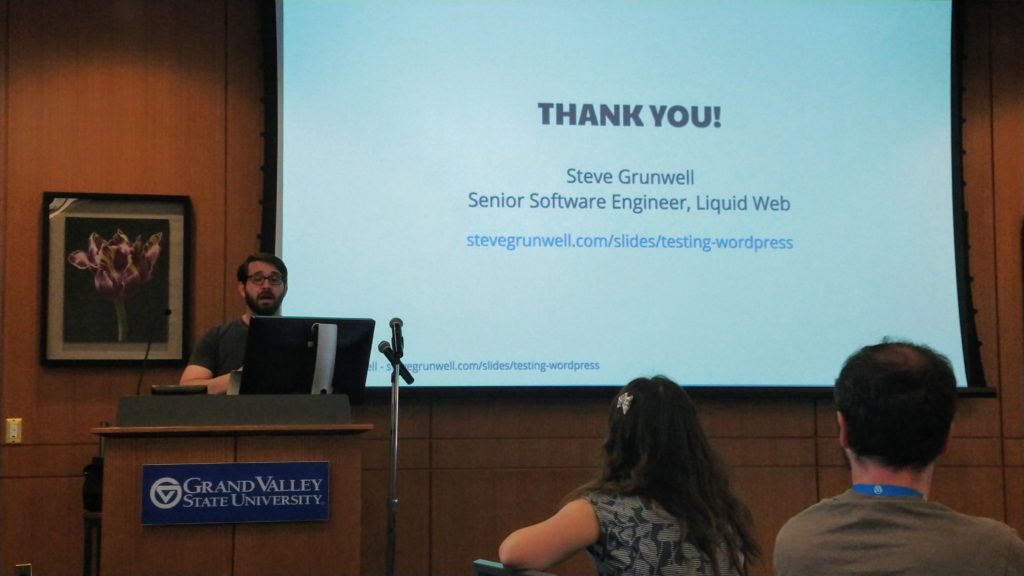
Steve Grunwell - Testing WordPress

https://stevegrunwell.github.io/confidently-testing-wordpress/#/

Testing Fundamentals

Automated Testing

  • Reduces time + chance of human error
  • Easily reproducible
  • Gateway to CI/CD

Test Types

  • Unit – Test the smallest possible unit of an app. Often a single function
  • Integration – How individual components interact
  • End-to-End(E2E) – An entire path through an application

Automated Testing Pyramid

ROI for Testing

System Under Test (SUT)

  • The system we’re currently testing:
    • A single method
    • A class
    • A whole feature

WordPress Testing is Complicated

  • Tightly-coupled system
  • Difficult to test anything in true isolation

Testing Toolbox

PhpUnit – https://phpunit.de/

Structure

  • Test Suite – Collection of test classes
  • Test Class (class) – Collection of test methods
  • Test Case (method) – A single scenario to be tested

Assertions

  • True or False
  • Equality
  • Verify Contents – contains, regular expression matching
  • Negative Assertions

Test Doubles

Replacing actual systems with test versions.

  • Stub out/mock an API
  • Return known values

Mockery – popular library for creating test doubles

PhpUnit Markup Assertions – Assertions powered by DOMDocument

WP Core Test Suite

Scaffolding Out Test Suite

Generate test scaffolding via WP-CLI

What Do We Get?

  • phpunit.xml.dist
  • .phpcs.xml.dist
  • .travis.yml
  • bin/install-wp-tests.sh
  • tests/bootstrap.php
  • tests/test-sample.php

What We Don’t Get

  • Composer

Bootstrap File

  1. Locate the WordPress installation
  2. Gain access to the tests_add_filter() function.
  3. Load the main plugin file.
  4. Bootstrap WordPress core.

Base Test Class

  • HPUnit\Framework\TestCase
  • WP_UnitTestCase

Fixtures

@Group

Data Providers

  • Methods
  • @testWith

Factories (WordPress)

Generate users, posts, and more for testing.

  • factory->post->create()
  • factory->post->create_and_get()
  • factory->post->create_many()

Impersonating Users (WordPress)

Act as users with different roles & capabilities

go_to() (WordPress)

Change the current page context.

Checking for WP_ERRORs

Was the response an instance of WP_ERROR?

Writing Tests

Arrange – Act – Assert

  • Arrange – Set up the scenario
  • Act – Execute the code
  • Assert – Verify things happened as you expected

Testing Permissions

Registering a Custom Post Type

Testing Hooks

Testing Output

Stubbing HTTP Requests

Basic Test-Driven Development (TDD)

Basic Workflow

  1. Write a failing test to describe the functionality or behavior (Red)
  2. Write the code to make the test pass (Green)
  3. Refactor, rinse, repeat (Refactor)
Regression Tests

Similar Posts

  • /

    WordPress US 2019 – Design Systems: Crafting For Crafters – Jon Quach

    Jon Quach – https://jonquach.com/ Design Systems are important but can be complicated and hard to understand. What Are Design Systems? They are about process. They make up the interfaces and designs of a product. They help answer many design and development questions. What Are The Challenges of Design? There can be a breakdown of handoff between design and development. Things don’t always end up the way they were intended. No documentation. Nobody knows how developer created things. It’s not because people are bad at their jobs or don’t care. Lacking the understanding of how user interfaces and experience should work together. How Do You Create A Design System? You create a Design System to empower the team building the product. End users don’t care about…
  • /

    WordCamp US 2019 – Just Enough React for WordPress – Shannon Smith

    New Block Editor Discover the Possibilities Block templates Blocks instead of custom fields, shortcodes, etc How Does the New Block Editor Work? Uses React, JavaScript/JSX Blocks are like plugins There is a Core Layer & Editorial Layer React abstraction is built-in Cool Stuff Blocks can be reusable Backend Workflow-only blocks Block level locking – you can remove blocks that are not needed. React Uses JSON literals It’s in the HTML but doesn’t negatively affect the HTML Templates You can create block templates Can be assigned to existing post types You can have nested templates Compatibility Shortcodes Will continue to work as before but contained within a block Custom Post Types Metaboxes Can be converted to blocks Can be used in the block editor Themes You…
  • /

    Lucky 7: Don’t Do Anything Until You Hear This – Joe A Simpson Jr

    http://bit.ly/joesimpsonjr-wcgr Hosting I purchase too much hosting… Start with free and level up as you learn WordPress Compare what you need Considerations Site Traffic eCommerce Site Speed Environmentally conscious Staging Uptime Site Design Why doesn’t my site look like the demo? Setup the test data for the demo Make sure there is support I have a premium theme but I can’t move things around. Page Builder or Traditional Theme? Do you need flexibility or are you OK with the theme restrictions? Accessibility Accessibility makes me angry… Color Links without underline can affect people with color blindness Colors shouldn’t be the only way to convey a message Color contrast testing Start with an Accessible Theme Check with the Tab Key – Does it navigate the site…
  • /

    WPGR: Learn about the Developer Tools in your browser

    Firefox Developer Tools – Topher Inspector – look at HTML/CSS behind a web page Responsive Display Mode Console – look for errors (security/resource loading issues) Different results depending on when you open – loading vs loaded Debugger – for JavaScript Style Editor – for changing CSS Performance – monitoring page load performance Network – Storage – Local browser items, page cache, cookies, etc. Chrome Developer Tools – Brian Shortcuts – keyboard commands to open dev tools (CTRL-OPT-I[Mac OS X]/CTRL-SHIFT-I[ChromeOS]) Docking – SHIFT-CMD-D(Mac OS X) / CTRL-SHIFT-D(Chrome OS) Elements (inspector) Styles – Filter allows for viewing specific CSS states (i.e. :hover) Add specific element styles Color Swatch – has a color picker, can save swatches Computed Styles View a visual representation of spacing See the CSS that…
  • /

    WordPress Grand Rapids – September 2018: Show And Tell

    Nicole – BoldGrid Post & Page Builder Free & Premium Versions Not Compatible With Editing on Mobile Not Yet Compatible With Gutenberg Premium Designer Blocks & Sliders BoldGrid Central Free cloud-based WordPress instances for testing things out. Crio WordPress Theme Available on ThemeForest Topher – BigCommerce Provides a plugin that pushes your BigCommerce store content to WordPress. All-one SaaS platform. Uses an iframe for checkout so all transactions are at BigCommerce for PCI compliance Can connect BigCommerce to Amazon as a channel. WordPress is just like a channel in BigCommerce and you can push specific products or product categories to different WordPress sites. Request WordPress Beta Access and get free Dev BigCommerce access for life. General Tips Plugins Imsanity

Leave a Reply

Your email address will not be published. Required fields are marked *

This site uses Akismet to reduce spam. Learn how your comment data is processed.

To respond on your own website, enter the URL of your response which should contain a link to this post's permalink URL. Your response will then appear (possibly after moderation) on this page. Want to update or remove your response? Update or delete your post and re-enter your post's URL again. (Find out more about Webmentions.)